IsEverythingSafe · Creator content library
Important Accounts · Approved · 2026-10-07

Review broadband before renewal

Keep broadband account details, notice dates and a useful review date together before deciding what to do next.

Download complete pack

Your household feature story

A captioned portrait film using app screenshots, household graphics and narration. No music supplied.

Download film

Clean picture master · Timed captions

Fictional household example. Does not cancel, switch or renegotiate a subscription. Reminder delivery has not been demonstrated.

Three Stories

1080 × 1920. Add a native link sticker to the final frame.

Make your own edit

Film your own introduction and ending, using these app assets for the middle.

Download clean clip

Keep the fictional-demo label visible in your edit.

View household imagery storyboard

App walkthrough sequence

01 · When does the deal end?

The broadband bill arrives. When does the deal end, and when should we review it?

02 · Start with the account

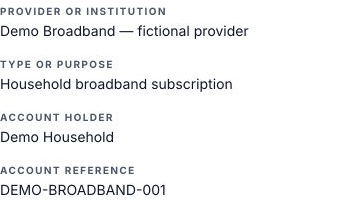
In Is Everything Safe, keep the provider and account reference in Important Accounts.

03 · Record the useful dates

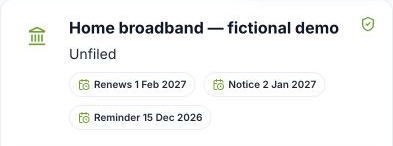
Check your agreement, then add the renewal date and the date you need to give notice.

04 · Choose a review date

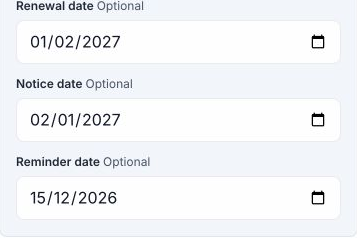
Choose a reminder date before you need to act, so there is time to review your options.

05 · Ready for the conversation

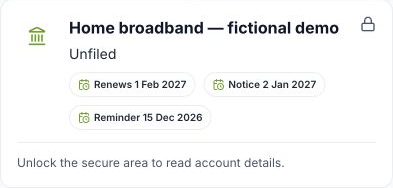
The dates remain available while the secure area is locked. Unlock it to read the account details.

06 · Start with one subscription

Start with one household subscription. Explore Important Accounts on our Features page.

Creator guide

Download guide · Caption and alt text

Link your audience to https://www.iseverythingsafe.com/features using a Story link sticker or bio link. The Features page leads to pricing and signup.

Adapt the supplied films, carousels, Stories, app assets, household imagery and storyboards to your own voice and format. Keep the feature demonstration accurate and retain fictional-demo and dated-capture labels. Household imagery is AI-generated and illustrates a fictional household.

Make only endorsements that reflect your experience. No music is supplied: use music licensed for your intended use. Paid advertising reuse of a creator’s face, voice or original footage requires separate agreement.

Send your final edit to Clive for approval before posting. Check the product claims, captions and audience link. Do not show real household records, credentials or recovery phrases.

Suggested caption

Before the broadband deal ends, gather the account details and choose a useful date to review it. You decide and contact the provider.

Fictional household example. Does not cancel, switch or renegotiate a subscription. Reminder delivery has not been demonstrated.

Explore this feature at https://www.iseverythingsafe.com/features using my bio link.

Household imagery storyboard

Keep broadband account details, notice dates and a useful review date together before deciding what to do next.

Use this six-scene sequence as a starting point for your own film, carousel or Stories. The household scenes introduce and close the story; the actual app screenshots show the feature in the middle.

Download storyboard overview Scene notes · Editable scene plan

01 · AI household illustration

When does the deal end?

When does the deal end? · AI household illustration

Visual: Open with household paperwork. Add the feature-specific question as a title; this scene establishes context.

Suggested voice: The broadband bill arrives. When does the deal end, and when should we review it?

Download scene asset
02 · Actual app screenshot

Start with the account

Start with the account · Actual app screenshot

Visual: Show this app screenshot or its matching supplied app clip. Keep the demo labels and feature limitations.

Suggested voice: In Is Everything Safe, keep the provider and account reference in Important Accounts.

Download scene asset
03 · Actual app screenshot

Record the useful dates

Record the useful dates · Actual app screenshot

Visual: Show this app screenshot or its matching supplied app clip. Keep the demo labels and feature limitations.

Suggested voice: Check your agreement, then add the renewal date and the date you need to give notice.

Download scene asset
04 · Actual app screenshot

Choose a review date

Choose a review date · Actual app screenshot

Visual: Show this app screenshot or its matching supplied app clip. Keep the demo labels and feature limitations.

Suggested voice: Choose a reminder date before you need to act, so there is time to review your options.

Download scene asset
05 · Actual app screenshot

Ready for the conversation

Ready for the conversation · Actual app screenshot

Visual: Show this app screenshot or its matching supplied app clip. Keep the demo labels and feature limitations.

Suggested voice: The dates remain available while the secure area is locked. Unlock it to read the account details.

Download scene asset
06 · AI household illustration

Start with one subscription

Start with one subscription · AI household illustration

Visual: Close with the warm family scene and a Features link. This is an illustration, not a customer testimonial.

Suggested voice: Start with one household subscription. Explore Important Accounts on our Features page.

Download scene asset
Fictional household example. Does not cancel, switch or renegotiate a subscription. Reminder delivery has not been demonstrated. Adapt the wording to your own experience and send the final edit to Clive for approval before posting.

Household imagery

Use these household scenes to introduce or close your feature story, with the app demonstration in between. These AI-generated scenes are included in your complete pack.

Carousel bookends

1080 × 1350 · Opening and closing layouts.

Story bookends

1080 × 1920 · Add your audience link sticker.

Clean household backgrounds

4:5 and 9:16 · Use these scenes in your own layout.

Download imagery alt text